• Well-being •9 min read

• Well-being •9 min read
To block explicit content, use native iOS Screen Time settings by navigating to Settings > Content & Privacy Restrictions > Web Content and selecting Limit Adult Websites. For a more secure, no-bypass solution, use AppBlock. Its Strict Mode prevents users from disabling restrictions or deleting the app, while the Safari Extension enables advanced keyword-based blocking to filter specific triggers that native settings often miss.
For many adults, an unrestricted smartphone is more than just a tool. When it comes to sexual temptation, it can feel like a baggie of narcotics carried in the pocket at all times. Pornography works similarly to a drug, triggering massive dopamine releases that cause the brain to become dependent on these hits to function normally. Over time, this cycle leads to blunting, where the brain no longer responds to healthy, real-life activities, leaving the user trapped in a state of emotional distress and dependency.
Breaking this cycle isn’t about willpower alone. It’s about creating an environment that works with you, not against you. Learning how to block adult content and setting up clear technical boundaries can remove constant triggers and give your brain the space it needs to reset.
At the end, you have two options. You can rely on native iPhone settings for limited controlor choose a stronger, no-loophole solution AppBlock.
Apple provides built-in tools within the iOS kernel to help you block inappropriate sites on iPhone.
1. Enable Screen Time: Go to Settings > Screen Time > Turn On Screen Time.
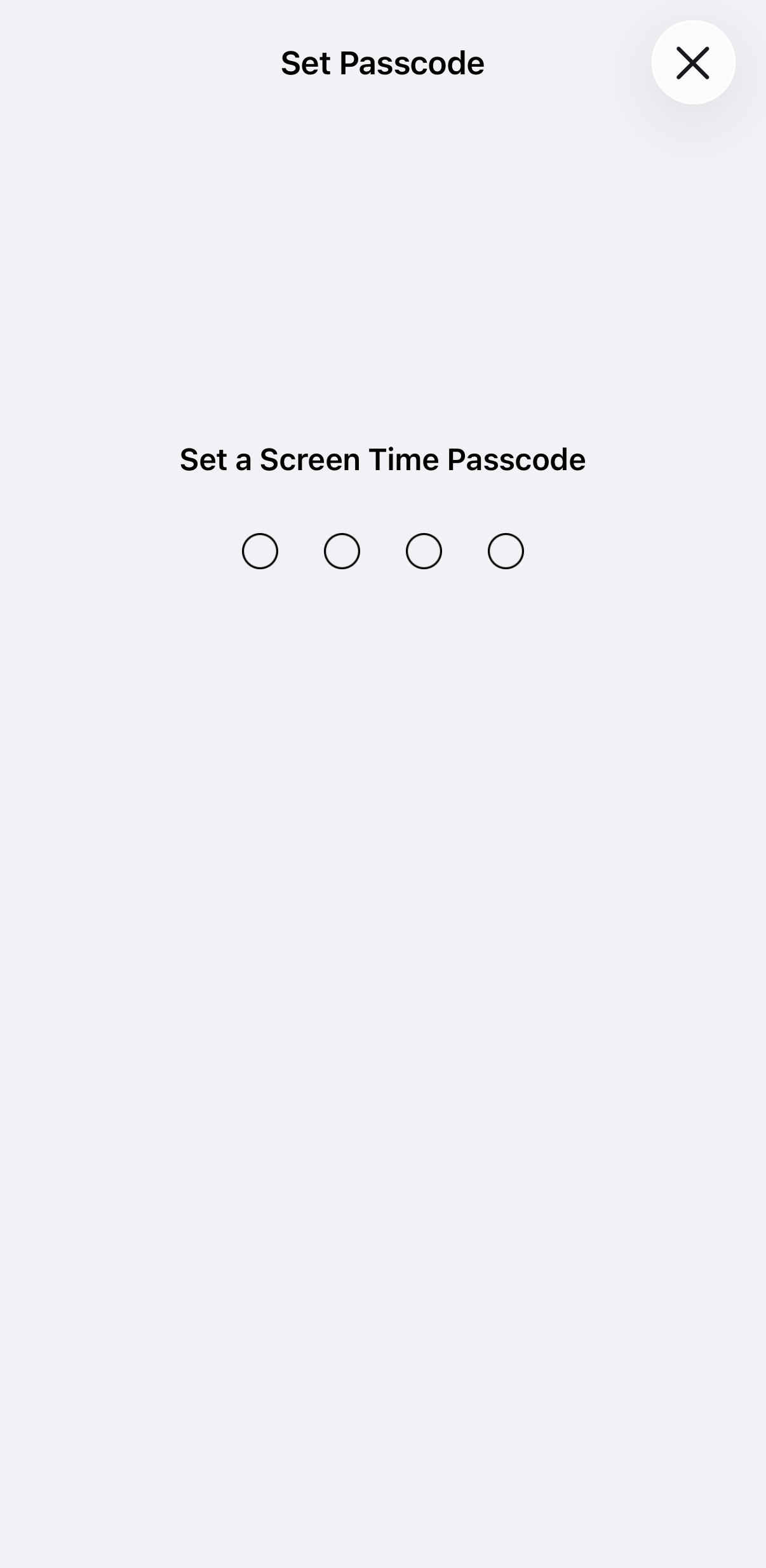
2. Set a Passcode: Tap Lock Screen Time Settings. Choose a code different from your phone unlock code to prevent bypassing.
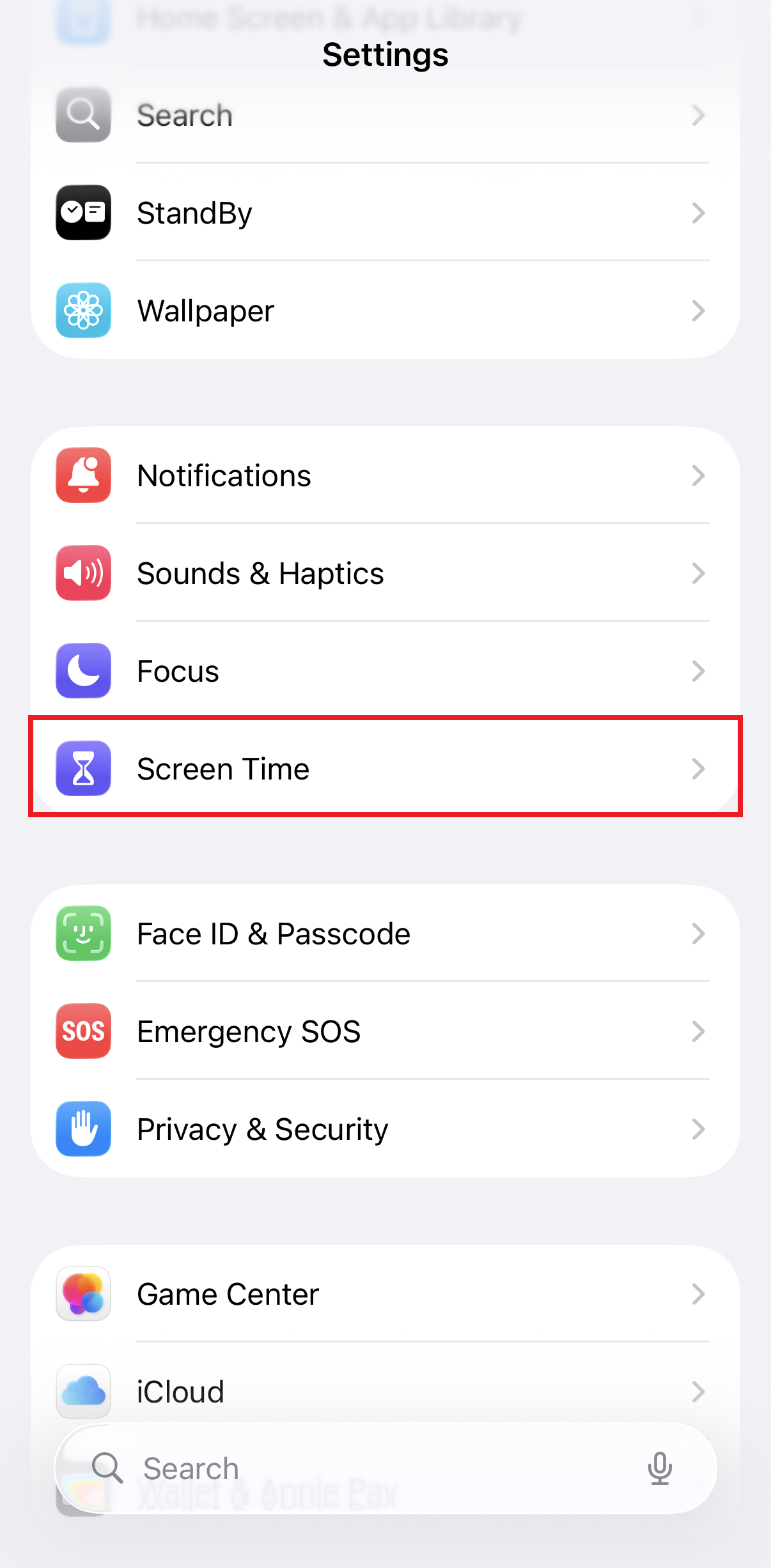

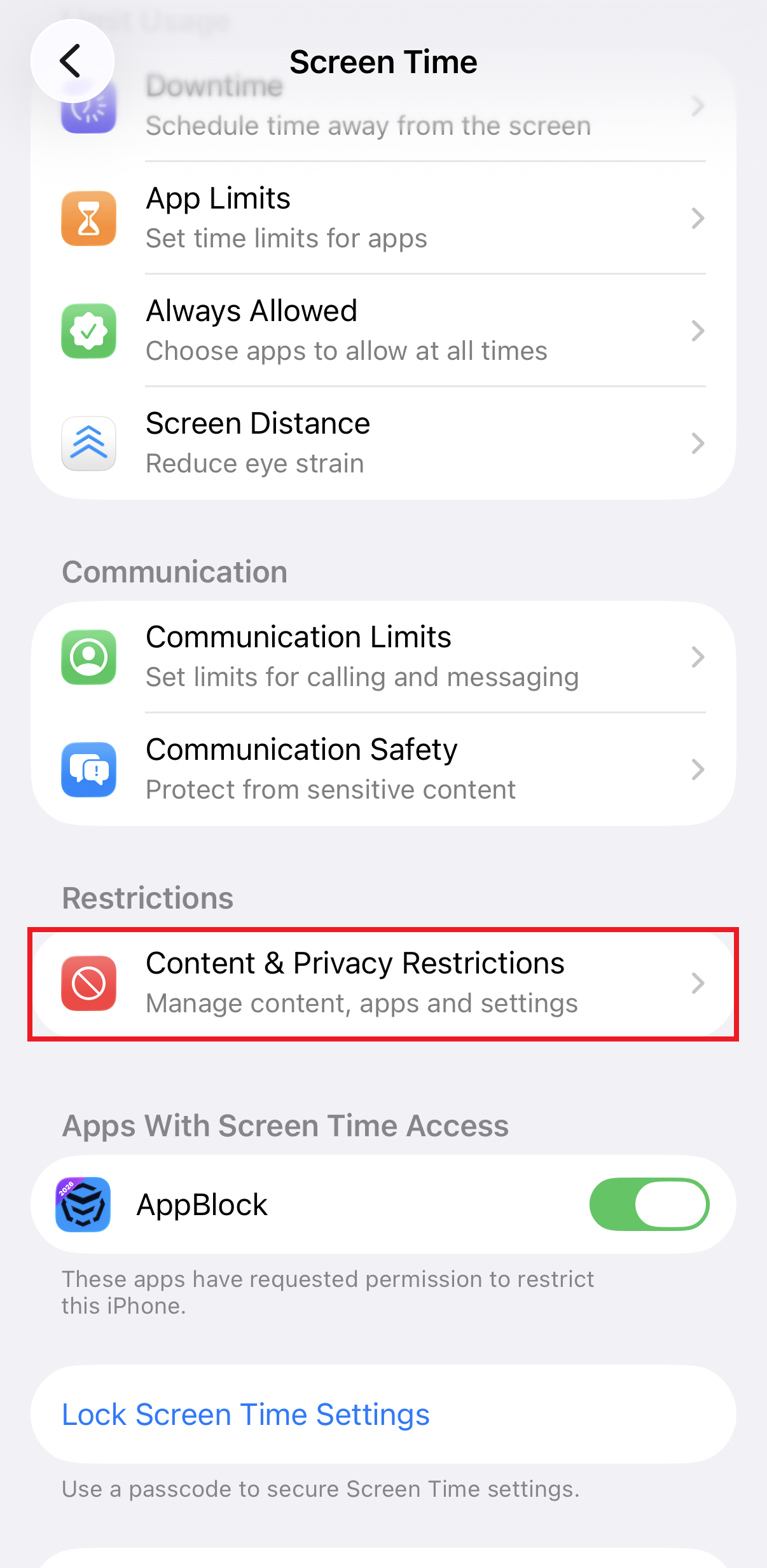
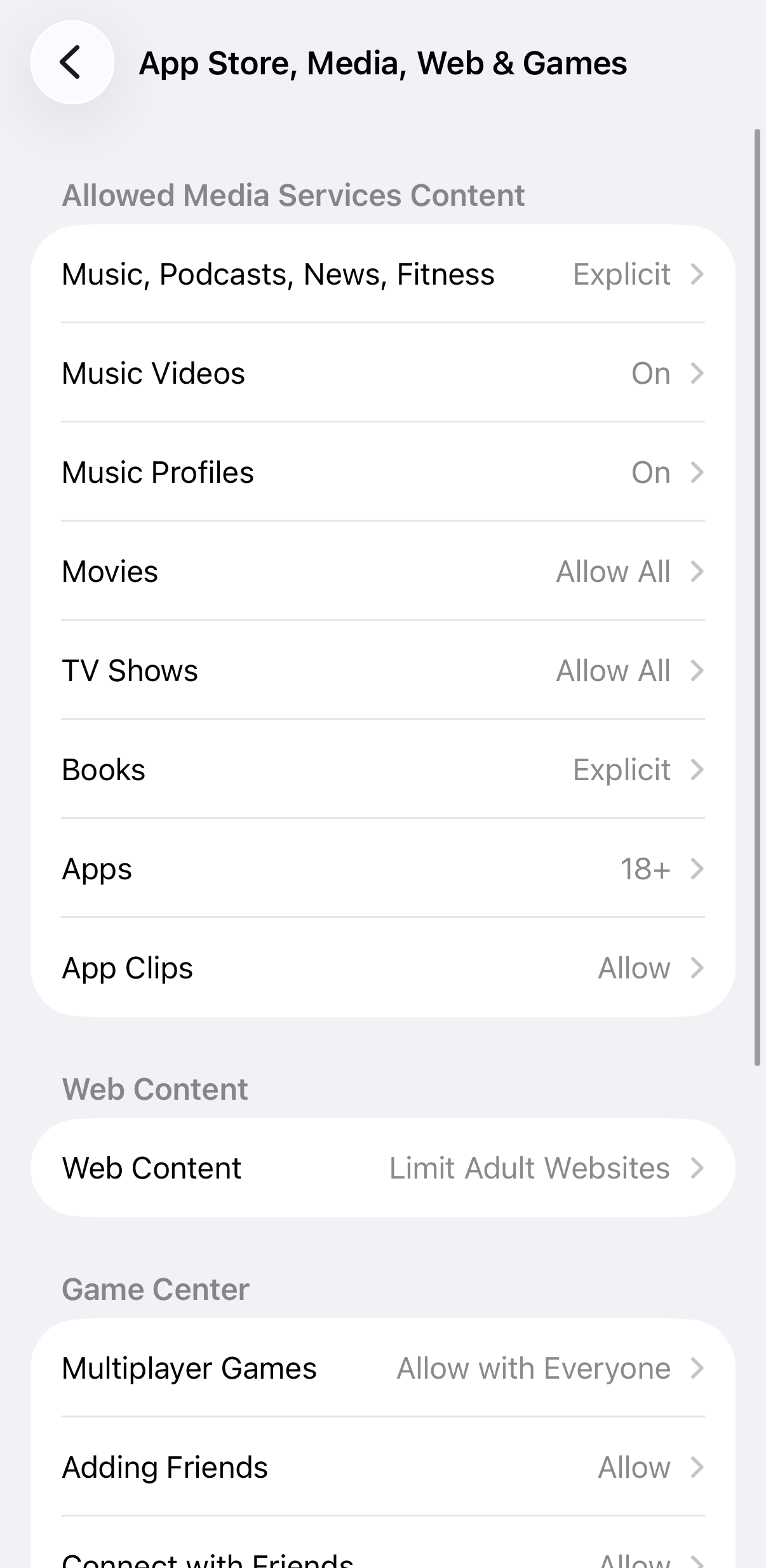
3. Restrict Web Content: Go to Content & Privacy Restrictions > App Store, Media, Web & Games > Web Content.
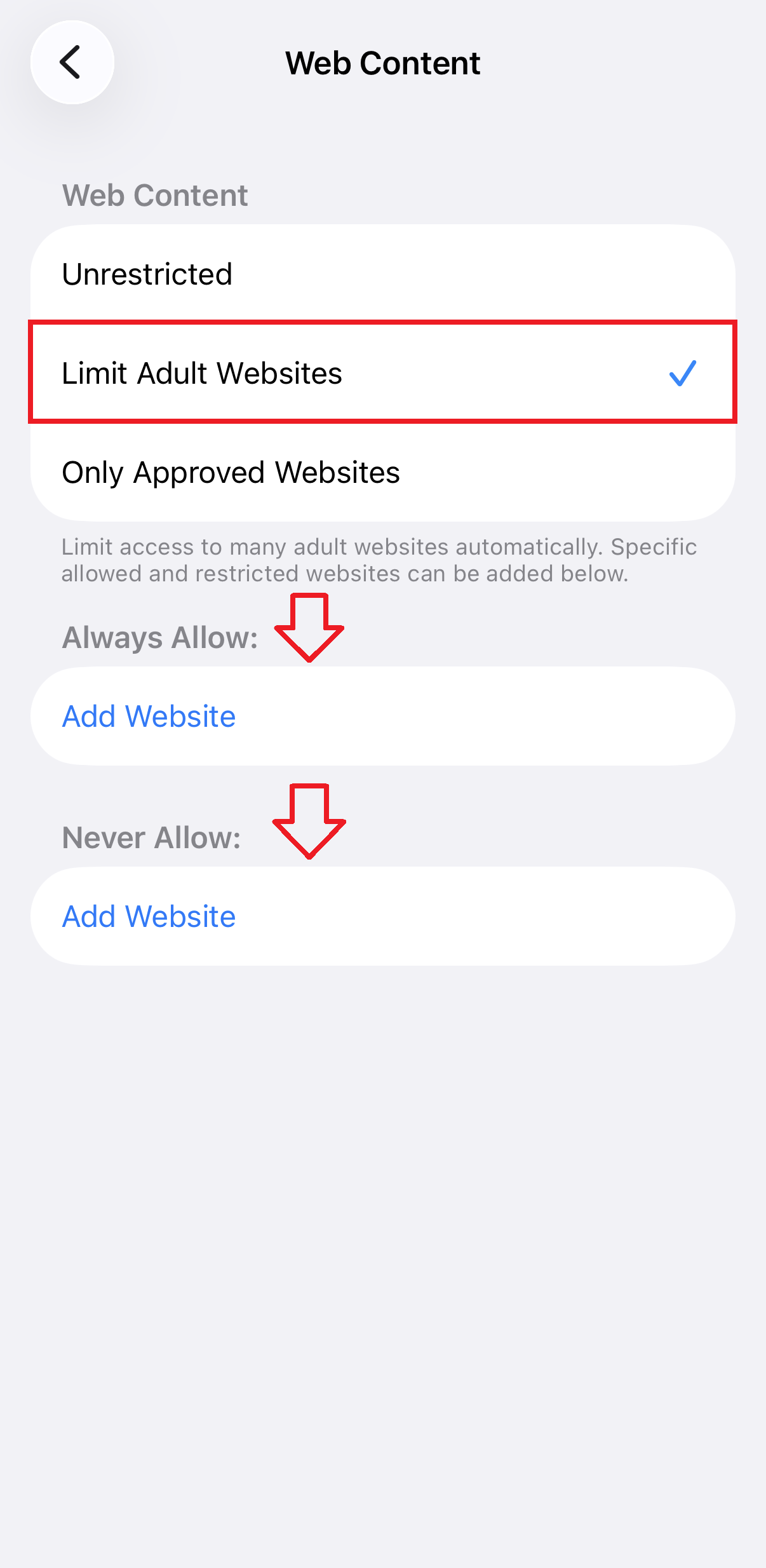
4. Select “Limit Adult Websites”: This automatically filters known adult domains.
5. Manual Hard-Block: Under the “Never Allow” section, you can manually tap Add Website and enter specific URLs you want to block forever.
The Catch: While native tools are a great baseline, tech-savvy users often find loopholes. Furthermore, native filters often fail to block content inside “in-app browsers” (like those within Instagram or Discord).
If you’re looking for a way to block inappropriate content on your iPhone without loopholes or easy workarounds, AppBlock acts like a digital policeman that doesn’t look away. Unlike Apple’s built-in Screen Time, which can often be bypassed, AppBlock gives you stronger, smarter control over what your device can access. With the app that blocks websites and apps, you can shut down adult sites for good, block triggers at the source, and create real boundaries that actually hold, so your phone supports your goals instead of constantly testing them.
1. Download AppBlock: Get the app from the App Store and grant the necessary Screen Time API permissions.
2. Create a Schedule or Quick Block: Select the browsers and apps you want to restrict.
3. Enable the Safari Extension: AppBlock leverages a specialized extension to provide keyword-based blocking, allowing you to block any URL containing specific “trigger words” – a feature missing from native iPhone settings.
4. Activate Strict Mode: This is the game-changer. Once you turn on Strict Mode, you can lock your settings for a specific duration or until you reach a specific location.
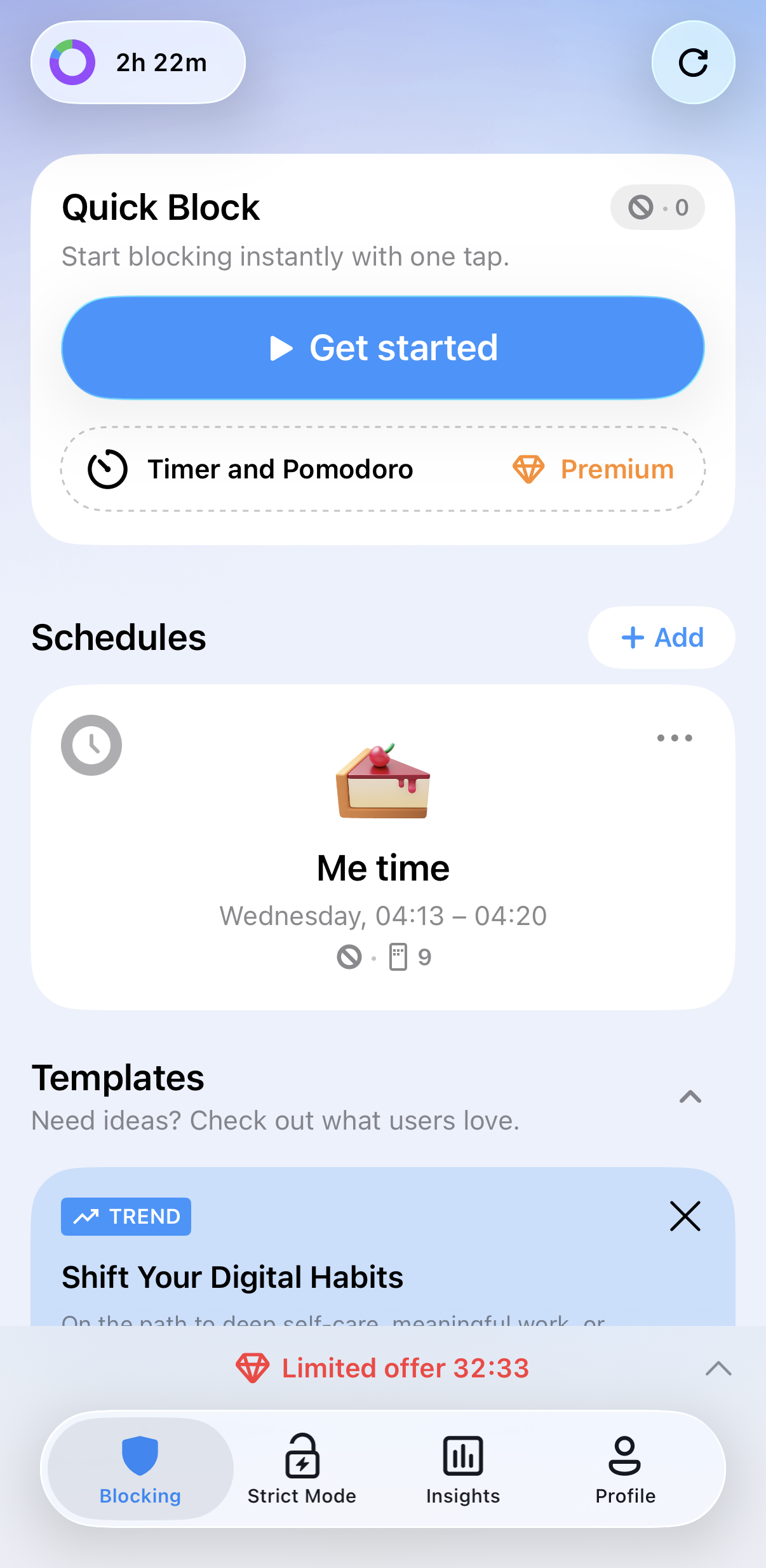


Many people ask how to block adults websites on my iphone permanently. The answer is Strict Mode. It prevents you from disabling blocks or deleting the app when your willpower is low.
• Disable Incognito Mode: AppBlock can disable incognito/private browsing in Safari to ensure all web activity remains subject to your filters. How extensions work in incognito mode?
• Nudity Warnings: In your iPhone Settings > Privacy & Security, turn on Sensitive Content Warning to automatically blur nude photos and videos before they are viewed.
Our phones steal an average of six hours a day from us. By taking the time to block adult content iphone, you aren’t just filtering the web, you’re reclaiming your focus for work, friends and rest.
Ready to build a healthier relationship with your technology? Join thousands success stories and download AppBlock for iOS today to experience the most effective way to stay productive and safe online.
Yes, you can block explicit content using Apple’s built-in Screen Time settings by navigating to Content & Privacy Restrictions and selecting Limit Adult Websites under the Web Content menu. However, for a more bulletproof solution, many users prefer a dedicated site blocker for iPhone like AppBlock. While native settings can sometimes be bypassed, AppBlock’s adult content blocking feature provides a more robust layer of protection across your device.
You can use the native iOS features for free. Go to Settings > Screen Time > Content & Privacy Restrictions > Web Content and check Limit Adult Websites. While this is a solid free start, be aware that determined users often find workarounds, such as using hidden browsers or changing device time zones. To prevent this, using an app with Strict Mode is highly recommended to ensure the restrictions actually stick.
Yes, AppBlock includes a dedicated adult content blocking tool found in the Extra Options for Premium users. Beyond just filtering known explicit URLs, AppBlock allows you to block specific keywords. This means if a site’s domain or URL contains restricted terms, AppBlock will automatically prevent it from loading, giving you much broader protection than standard URL-only filters.
The most effective way to restrict sites on iPhone without fear of bypass is to use Strict Mode (AppBlock). Native iOS restrictions can often be turned off if someone knows the passcode or finds a software glitch. AppBlock’s Strict Mode makes it nearly impossible to disable the block or even delete the app during your focus sessions.
You can use AppBlock to set up a Keyword blocklist. Instead of just blocking one URL at a time, you can enter keywords related to adult content. You can even choose the “Anywhere in URL” setting, which will trigger a block if the keyword appears anywhere in the site’s address, providing a massive advantage for mass restriction of unwanted content.
Gain back control over your screen, empower your life with AppBlock.
Try for free
The rise of technology has led to students being more plugged in than ever before. While this digital age brings numerous educational opportunities, it also…
If you are here, you likely spend too much time scrolling social media AND want to change that. Great job! You made the most important…

A big part of our lives is now happening online. But sometimes it is great to take a step back and think about the impact of the technologie...





